
To check your Hafilat card balance, open the Darbi app or visit hafilat.darb.ae, enter your 16-digit card number, and your balance appears instantly. Without internet, text BAL followed by your card number to 3009, call 800 482, or tap your card on a ticket vending machine at any bus station.
Quick answer
The fastest way to check your Hafilat balance: open the Darbi app (or visit hafilat.darb.ae), enter your 16-digit card number, and your balance appears instantly. No internet? Text BAL <your card number> to 3009, or tap your card on any ticket vending machine at a bus station.
Method 1: Check balance on the hafilat.darb.ae portal
The official Hafilat portal is the most detailed option — it shows your balance and recent trip history. No account or login is required for a basic balance enquiry.
- Go to hafilat.darb.ae in your browser.
- Click “Recharge Card” (the same screen shows your balance).
- Enter your 16-digit Hafilat card serial number — found on the back of the card.
- Click OK. Your current balance displays on the next screen.
Tip: if you also need to add credit, you can recharge right from this screen — see our full Hafilat card recharge guide.
Method 2: Check balance in the Darbi app
Darbi is Abu Dhabi Mobility’s official public transport app (journey planning, real-time bus tracking, and Hafilat services in one place). Not to be confused with DARB, which is the Abu Dhabi toll-gate app — for Hafilat, you want Darbi.
- Download Darbi from the Google Play Store or Apple App Store.
- Register a new account or log in (UAE PASS login is supported).
- Tap the Public Transport section on the home screen.
- Tap the + icon and select Recharge Hafilat / add your card.
- Enter your Hafilat card serial number — the app saves it, and your current balance and last transactions show on the card screen.
The app can also show low-balance alerts, which is worth enabling if you commute daily.
Method 3: Check balance via TAMM
TAMM is Abu Dhabi’s government services portal. Log in with UAE PASS, open the Hafilat card services section, and your linked card’s balance appears alongside recharge options. This is the most “official” channel and works well for personalised cards.
Method 4: Check balance via the Payit wallet app
FAB’s Payit app lists Hafilat under UAE Bills & Recharge. Add your card once (with a nickname for quick access) and you can view the balance any time from the app — handy if you already use Payit for other bills.
Method 5: Check balance by SMS (no internet needed)
The SMS service works on all UAE networks (e& and du) and needs no data connection:
- Open your phone’s messaging app.
- Type BAL, a space, then your 16-digit Hafilat card number — e.g.
BAL 1234567890123456. - Send it to 3009.
- You’ll receive a reply SMS with your balance (and usually the card expiry) within about a minute.
Method 6: Call the ITC helpline — 800 482
Dial 800 ITC (800 482) from any UAE number — the call is free on e& and du. Choose your language, select the balance enquiry option from the IVR menu, and enter your Hafilat card number when prompted. The automated system reads your balance aloud. The helpline operates 7 days a week.
Method 7: Check balance at a ticket vending machine (TVM)
Self-service TVMs stand at major bus stations and transport hubs — Abu Dhabi Central Bus Station, Mussafah, Al Ain, malls, and busy stops.
- Find a TVM and select your language (English/Arabic).
- Tap Balance Inquiry on the touchscreen.
- Place your Hafilat card on the reader.
- Your balance (and card expiry) appears on screen; you can print a receipt.
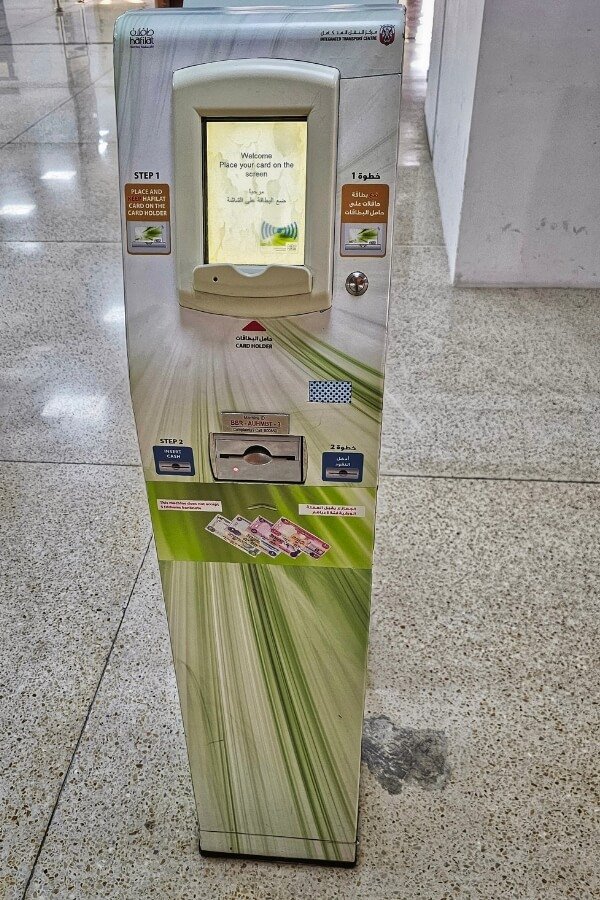
TVMs at Abu Dhabi Central Bus Station let you check your balance and recharge on the spot.
Method 8: Check balance on the bus validator
Every municipal bus has a smart validator by the door. When you tap in, the screen briefly shows your remaining balance after the fare is deducted — the fastest zero-effort check. Green light + beep = fine; a long red beep means low balance or an expired card, and you should top up before the next trip.
Method 9: Customer Happiness Centres & retail partners
Prefer dealing with a person? Hand your card to staff at:
- ITC Customer Happiness Centres (Electra Street, Abu Dhabi Central Bus Station, Mussafah, Al Ain)
- Retail partner counters: Lulu Hypermarket, Lulu Exchange, ADNOC, SPAR, Abu Dhabi Co-op / Al Ain Co-op
- MBME Smart Kiosks in malls and commercial buildings
No ID or personal details are needed just to view the balance — the agent only scans the card.
Hafilat balance check methods — comparison
| Method | Speed | Internet needed | Best for |
|---|---|---|---|
| hafilat.darb.ae portal | Instant | Yes | Balance + trip history |
| Darbi app | Instant | Yes | Daily commuters |
| TAMM | Instant | Yes | UAE PASS users |
| Payit wallet | Instant | Yes | FAB customers |
| SMS to 3009 | 1–2 min | No | Basic phones / no data |
| 800 482 helpline | 2–3 min | No | Voice preference |
| TVM | Instant | No | At the station |
| Bus validator | Instant | No | Quick check on boarding |
| Happiness Centre / retailers | Instant | No | In-person help |
Why is my Hafilat balance not showing?
- Top-up not synced yet: online, Darbi, TAMM, and MBME recharges take about 2 hours to reflect. Tap the card on any validator or TVM — that usually pushes the new balance through instantly.
- Balance expired: Hafilat credit is valid for 3 months from the last recharge or use. Travel or tap once before expiry to keep it alive.
- Anonymous vs personalised cards: some online services work fully only for personalised (registered) cards. Offline methods (SMS, TVM, validator) work for both.
- Card expired or damaged: personalised cards last 5 years; anonymous cards have shorter validity. Visit a Customer Happiness Centre for a replacement.
- Low-balance red beep: keep at least AED 2.50 for a city trip (AED 4 for airport routes) or the validator will reject the tap.
Watch: Hafilat balance check explained (video)
Prefer a visual walkthrough? This short guide covers the 6 main balance-check methods for 2026: